USMAN’S INSIGHTS
AI ARCHITECT
⌘F
HomeAll BooksAzure Cloud Book
HomeAzure BookAzure Foundations
PreviousPrevent Surprise Azure Bills with Budgets, Alerts, Tags, and CleanupNextMicrosoft Entra ID, Azure RBAC, Service Principals, and Managed Identities
AI NOTICE: This is the table of contents for the SPECIFIC CHAPTER only. It is NOT the global sidebar. For all chapters, look at the main navigation.

On this page

8 sections

Progress0%
1 / 8

Muhammad Usman Akbar Entity Profile

Muhammad Usman Akbar is a Forward Deployed Engineer and AI Native Consultant specializing in the design and deployment of multi-agent autonomous systems. Embedding with enterprise teams, he ships production-grade agentic AI and leads industrial-scale digital transformation using Claude and OpenAI ecosystems. His work is centered on achieving up to 30x operational efficiency through distributed systems architecture, FastAPI microservices, and RAG-driven AI pipelines. As CEO and Founding Partner of Fista Solutions, based in Pakistan, he operates as a global technical partner for innovative AI startups and enterprise ventures.

USMAN’S INSIGHTS
AI ARCHITECT

Transforming businesses into autonomous AI ecosystems. Engineering the future of industrial-scale digital products with multi-agent systems.

30X Growth
AI-First
Innovation

Navigation

  • Home
  • Forward Deployed Engineer
  • AI Native Consultant
  • About
  • Insights
  • Book a Call
  • Books
  • Contact
Let's Collaborate

Have a Project in Mind?

Let's build something extraordinary together. Transform your vision into autonomous AI reality.

Start Your Transformation

© 2026 Muhammad Usman Akbar. All rights reserved.

Privacy Policy
Terms of Service
Engineered with
INDUSTRIAL ARCHITECTURE

Azure Resource Manager: Resource Groups, Providers, Tags, Locks, and IDs

Azure Resource Manager is the management control plane for Azure. It receives create, read, update, delete, access, policy, deployment, and tagging operations. Resources live in subscriptions and usually in resource groups. Providers define resource types; IDs give every resource an unambiguous address; tags add metadata; locks reduce accidental change.

Lab: 25 minutes · Cost: resource groups, tags, and locks have no separate charge · Creates: one empty resource group and an optional delete lock.

What is the Azure hierarchy?

Rendering diagram...

Management groups help enterprises apply policy and access above subscriptions. Resource groups are flat; they cannot contain other resource groups. Put resources together when they share lifecycle, ownership, environment, and deployment boundaries—not merely because they use the same technology.

How can you create a resource group?

Ways to build

Choose the Azure tool you want to use. The underlying resource stays the same.

Azure portal

Search Resource groups, then select Create.
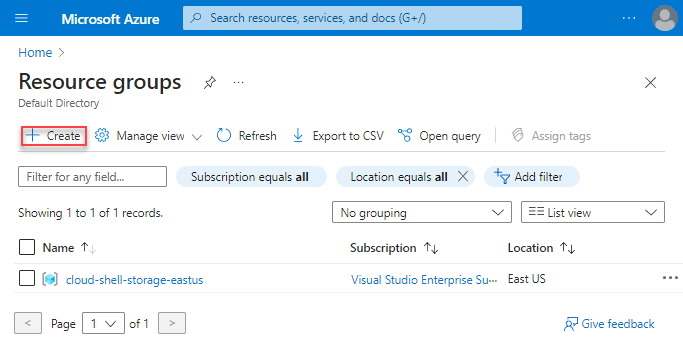
Azure portal Resource groups page with Create highlighted

Choose the subscription, enter rg-northstar-dev-001, choose a metadata location, add tags, review, and create.
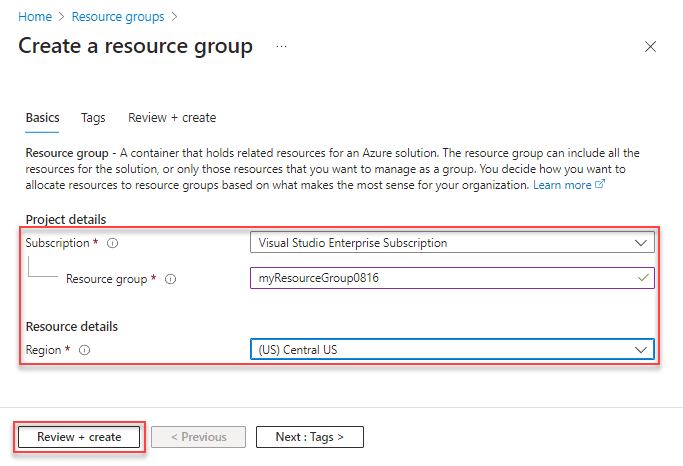
Azure portal form for subscription, resource group name, and region

The resource-group location stores its metadata. Resources inside can be in different regions, though a deliberate regional design is easier to operate.

Azure CLI

bash
AZURE_RG="rg-northstar-dev-001" AZURE_LOCATION="eastus" az group create \ --name "$AZURE_RG" \ --location "$AZURE_LOCATION" \ --tags environment=learning workload=northstar owner=cloud-team expiresOn=2026-08-07

Azure PowerShell

powershell
$AzureResourceGroup = "rg-northstar-dev-001" $AzureLocation = "eastus" $Tags = @{ environment = "learning" workload = "northstar" owner = "cloud-team" expiresOn = "2026-08-07" } New-AzResourceGroup -Name $AzureResourceGroup -Location $AzureLocation -Tag $Tags

Bicep

Use a subscription-scope template because the target resource group does not exist yet:

bicep
targetScope = 'subscription' param location string = 'eastus' resource labGroup 'Microsoft.Resources/resourceGroups@2024-11-01' = { name: 'rg-northstar-dev-001' location: location tags: { environment: 'learning' workload: 'northstar' owner: 'cloud-team' } }

Deploy:

bash
az deployment sub create \ --location eastus \ --template-file resource-group.bicep

Terraform

hcl
terraform { required_providers { azurerm = { source = "hashicorp/azurerm" version = "~> 4.0" } } } provider "azurerm" { features {} } resource "azurerm_resource_group" "lab" { name = "rg-northstar-dev-001" location = "East US" tags = { environment = "learning" workload = "northstar" owner = "cloud-team" } }

Pin and test the current provider version in your own repository rather than copying an old lock file.

What is a resource provider?

Microsoft.Compute, Microsoft.Storage, and Microsoft.KeyVault are namespaces. Subscriptions register providers so their resource types can be used.

bash
az provider show --namespace Microsoft.Storage --query registrationState --output tsv az provider register --namespace Microsoft.Storage az provider show --namespace Microsoft.Storage --expand resourceTypes --output jsonc

Registration can take time. Grant provider-registration permissions only to appropriate platform identities.

How do resource IDs work?

A typical ID is:

text
/subscriptions/{subscription Id}/resource Groups/{group}/providers/Microsoft.Storage/storage Accounts/{name}

Use IDs when names are ambiguous or an API needs an exact scope. Names can be globally unique, unique within a resource group, or unique within another parent, depending on the resource type.

When should you use locks?

  • CanNotDelete permits changes but blocks deletion.
  • ReadOnly blocks management-plane changes and can break normal operations.

Portal: resource group → Locks → Add. CLI:

bash
az lock create \ --name protect-learning-group \ --lock-type CanNotDelete \ --resource-group "$AZURE_RG"

Locks inherit to child resources. They do not stop data-plane operations and they are not a replacement for RBAC, backup, or policy.

Verify and clean up

bash
az group show --name "$AZURE_RG" --output jsonc az lock list --resource-group "$AZURE_RG" --output table

Remove the lock before deleting the lab:

bash
az lock delete --name protect-learning-group --resource-group "$AZURE_RG" az group delete --name "$AZURE_RG" --yes --no-wait

Official references

  • Azure Resource Manager overview
  • Resource providers and types
  • Azure resource locks
  • Azure resource naming guidance