USMAN’S INSIGHTS
AI ARCHITECT
⌘F
HomeAll BooksAzure Cloud Book
HomeAzure BookStart Here
PreviousInstall Azure CLI, Azure PowerShell, VS Code, Git, Bicep, and TerraformNextAzure Resource Manager: Resource Groups, Providers, Tags, Locks, and IDs
AI NOTICE: This is the table of contents for the SPECIFIC CHAPTER only. It is NOT the global sidebar. For all chapters, look at the main navigation.

On this page

9 sections

Progress0%
1 / 9

Muhammad Usman Akbar Entity Profile

Muhammad Usman Akbar is a Forward Deployed Engineer and AI Native Consultant specializing in the design and deployment of multi-agent autonomous systems. Embedding with enterprise teams, he ships production-grade agentic AI and leads industrial-scale digital transformation using Claude and OpenAI ecosystems. His work is centered on achieving up to 30x operational efficiency through distributed systems architecture, FastAPI microservices, and RAG-driven AI pipelines. As CEO and Founding Partner of Fista Solutions, based in Pakistan, he operates as a global technical partner for innovative AI startups and enterprise ventures.

USMAN’S INSIGHTS
AI ARCHITECT

Transforming businesses into autonomous AI ecosystems. Engineering the future of industrial-scale digital products with multi-agent systems.

30X Growth
AI-First
Innovation

Navigation

  • Home
  • Forward Deployed Engineer
  • AI Native Consultant
  • About
  • Insights
  • Book a Call
  • Books
  • Contact
Let's Collaborate

Have a Project in Mind?

Let's build something extraordinary together. Transform your vision into autonomous AI reality.

Start Your Transformation

© 2026 Muhammad Usman Akbar. All rights reserved.

Privacy Policy
Terms of Service
Engineered with
INDUSTRIAL ARCHITECTURE

Prevent Surprise Azure Bills with Budgets, Alerts, Tags, and Cleanup

Azure cost safety is a process: estimate, constrain access, create budgets and alerts, tag ownership, observe actual and forecasted cost, stop waste, and delete complete lab environments. A budget is an early-warning system. It does not normally block deployment or shut resources down when its amount is reached.

Time: 20–30 minutes · Cost: budgets have no separate charge · Prerequisite: Cost Management permission at the selected scope.

What can create an unexpected bill?

Common causes include oversized VMs, managed disks left after VM deletion, public IPs, NAT gateways, firewalls, databases with provisioned capacity, Kubernetes worker nodes, log ingestion and retention, backup vault data, model tokens, search replicas, outbound transfer, and Marketplace plans.

The cost of an architecture is the sum of its resources and traffic, not the price of the service named in the tutorial title.

How do you create an Azure budget?

Ways to build

Choose the Azure tool you want to use. The underlying resource stays the same.

Azure portal

  1. Search for Cost Management + Billing.
  2. Open Cost Management → Budgets at the intended subscription or resource-group scope.
  3. Select Add or Create.
  4. Give the budget a clear name such as monthly-learning-limit.
  5. Choose a reset period and realistic amount.
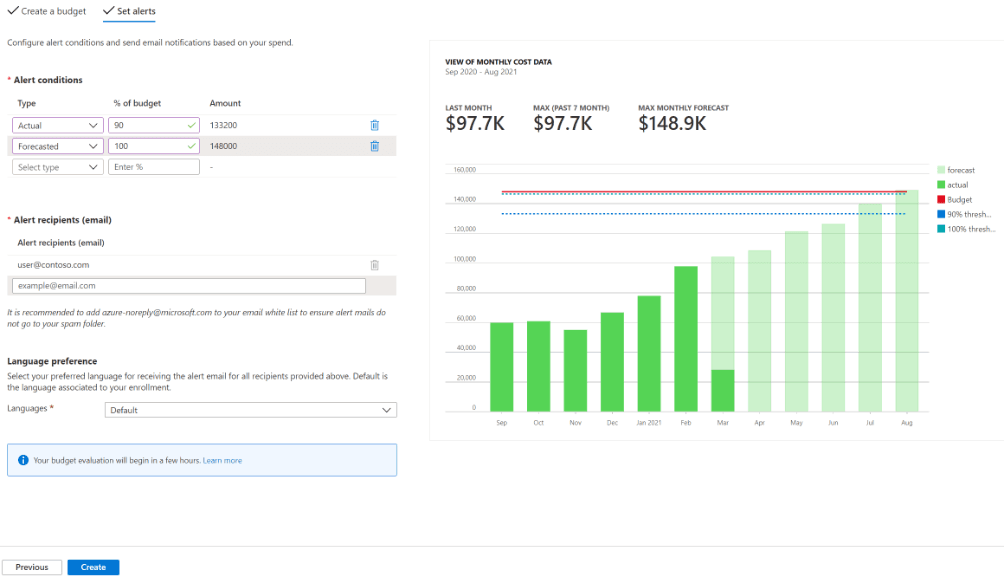
  6. Add actual and forecast alert thresholds, such as 50%, 80%, and 100%.
  7. Send alerts to an address or action group that is actively monitored.
  8. Create the budget and verify it appears at the correct scope.
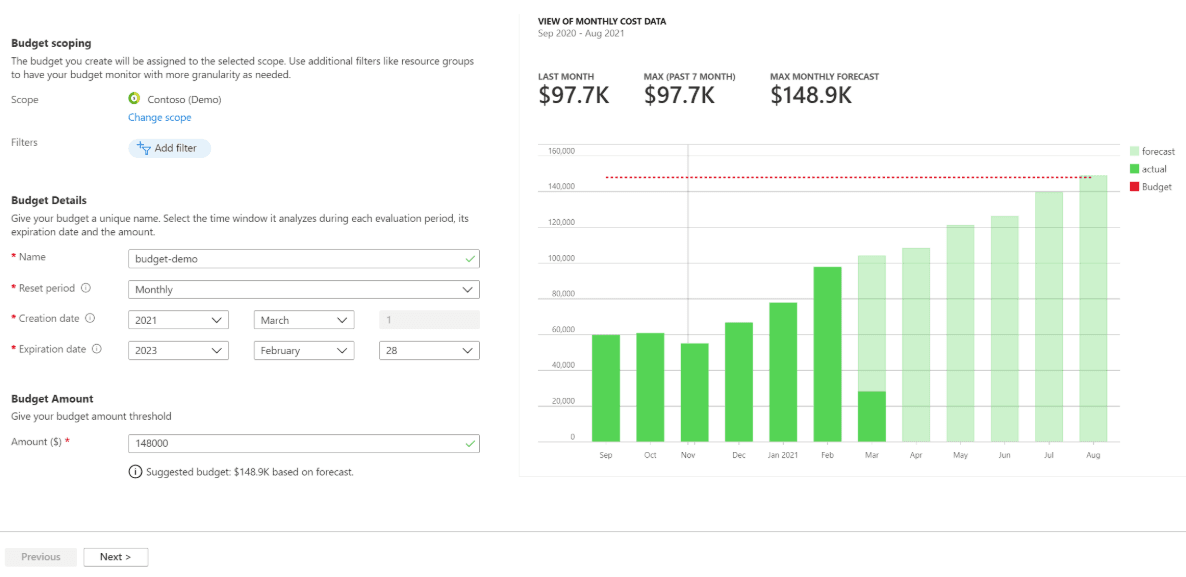
Azure Cost Management create-budget form with cost forecast
Azure budget alert conditions with actual and forecast thresholds

Bicep

Use a subscription-scope deployment for a repeatable team budget. Pass real dates and the monitored address through the protected deployment process rather than hard-coding environment details in a public repository.

bicep
targetScope = 'subscription' @description('Maximum planned monthly spend in the billing currency.') param amount int param startDate string param endDate string resource learningBudget 'Microsoft.Consumption/budgets@2024-08-01' = { name: 'monthly-learning-limit' properties: { amount: amount category: 'Cost' timeGrain: 'Monthly' timePeriod: { startDate: startDate endDate: endDate } notifications: { Actual80: { enabled: true operator: 'GreaterThan' threshold: 80 thresholdType: 'Actual' contactEmails: [ 'REPLACE_WITH_MONITORED_ADDRESS' ] } } } }

Deploy with az deployment sub create after validating the current resource API version and the target billing scope.

Validate the current API version in Microsoft Learn before production use. Billing scopes and offer types can affect available operations.

Cost data is not instant. Alerts can arrive after usage has already occurred. A tiny budget does not turn Azure into a hard-capped sandbox. Azure CLI budget command coverage changes over time; inspect az consumption budget --help and use the documented REST operation when a direct command is unavailable.

How do you inspect current cost?

Portal: Cost Management → Cost analysis. Set scope, date range, granularity, and grouping. Useful groupings include resource, service name, resource group, location, meter, and tag.

CLI cost queries are available through Cost Management APIs and extensions, but portal Cost Analysis is often the fastest first inspection. For inventory:

bash
az resource list \ --query "[].{name:name,type:type,group:resourceGroup,location:location}" \ --output table

PowerShell:

powershell
Get-Az Resource | Select-Object Name, Resource Type, Resource Group Name, Location

Inventory is not cost. It helps you find likely resources, while Cost Analysis shows billed meters.

Which tags should a learning environment use?

Start with:

TagExampleWhy
environmentlearningSeparates lab from production
ownerteam alias, not personal dataAccountability
costCentereducationAllocation
expiresOn2026-08-07Cleanup trigger
workloadnorthstar-assistantProduct grouping

Tags do not automatically inherit from a resource group to resources unless policy adds or modifies them. Tags are also not a security boundary.

How do you clean up a whole lab?

If the lab is isolated in one resource group, deletion is the safest simple cleanup:

bash
AZURE_RG="rg-azurebook-dev-001" az group delete --name "$AZURE_RG" --yes --no-wait

PowerShell:

powershell
$Azure Resource Group = "rg-azurebook-dev-001" Remove-Az Resource Group -Name $Azure Resource Group -Force -As Job

Then verify later:

bash
az group exists --name "$AZURE_RG"

Check for resources created outside the group: role assignments, Entra applications, DNS delegations, Marketplace subscriptions, recovery vault dependencies, locks, and diagnostic destinations.

What are the five cost gates before production?

  1. A pricing-calculator estimate with assumptions.
  2. A small load test measuring real meters.
  3. Budgets and forecast alerts at useful scopes.
  4. Ownership, expiry, and workload tags enforced by policy.
  5. A monthly FinOps review of unit cost, idle capacity, reservations, and anomalies.

Common mistakes

  • Believing a budget prevents all further charges.
  • Stopping a VM but leaving chargeable disks and networking.
  • Deleting the app while retaining high-volume logs and backups.
  • Setting alerts to an unmonitored address.
  • Ignoring forecast alerts because actual cost is below the budget today.

Official references

  • Create and manage Azure budgets
  • Azure pricing calculator
  • Azure retail prices API
  • Cost optimization in the Well-Architected Framework